
UCI WebReg Redesign
Web Design
Design Systems
Timeframe
Team
Role
Deliverables
2 weeks
Team of 5
UI Designer, UX Researcher
High-Fidelity Prototype, Pitch Deck

UCI WebReg is the university's website registration and course enrollment process used by over 36,000 students every year.
OVERVIEW
A two-week sprint to reimagine the enrollment process
The UCI University Registrar reached out to the UCI ANTrepreneur Center to conduct research and design solutions to help improve the current website and course registration process. During a two-week period hackathon, students worked in teams to build a prototype and pitch a presentation to judges — some of whom work for the UCI University Registrar.
PROBLEM
An outdated system where students had to create workarounds for themselves
The UCI WebReg is an outdated course registration site, which has caused many frustrations and inefficiencies for students during the enrollment process.

How to improve the old course enrollment process for students?
UX RESEARCH / COMPARATIVE ANALYSIS
Reliance on 4+ different sites to plan course schedules every quarter
Our team compiled a list of various existing websites that we wanted to reference. These are all very common resources UCI students utilize during the course registration period. But why is it that students had to access and gather information from multiple platforms in order to plan their schedules?
I created a list of notable features from each of these sites since these would be important to note when brainstorming features for our redesign.
What WebReg currently offers is minimal.
COMPARATIVE ANALYSIS
📰
General Catalogue
(course catalog)
View Site

Course descriptions
Course prerequisites & restrictions
Course unit value
🗓️
AntAlmanac
(schedule planner)
View Site
Calendar view of course schedule
Calendar view of final exam schedule
Allows for multiple schedule views
Integrated map view of campus with directions
🗓️
ZotCourse
(schedule planner)
View Site
Calendar view of course schedule
Calendar view of final exam schedule
Integrated instructor ratings
Integrated instructor grade distribution
Able to import schedule into Google Calendar
Print, Save, Export schedule
CURRENT SYSTEM
🗓️
WebReg
(enrollment system)
View Site
Modify course schedule (add/drop courses)
View course capacity (availability)
Join course waitlist
Modify grading option or unit value of a course
UX RESEARCH / SURVEY FINDINGS
Students were frustrated from losing their progress in the midst of schedule planning
The hackathon required all the teams to send out surveys to UCI undergraduate and graduate students. We helped collect 669 responses in total. Since every team was working to address the same problem, it became a matter of analyzing the huge amount of data and formulating solutions within our own team.
These were the key research findings that I compiled from the data.
Student Demographic
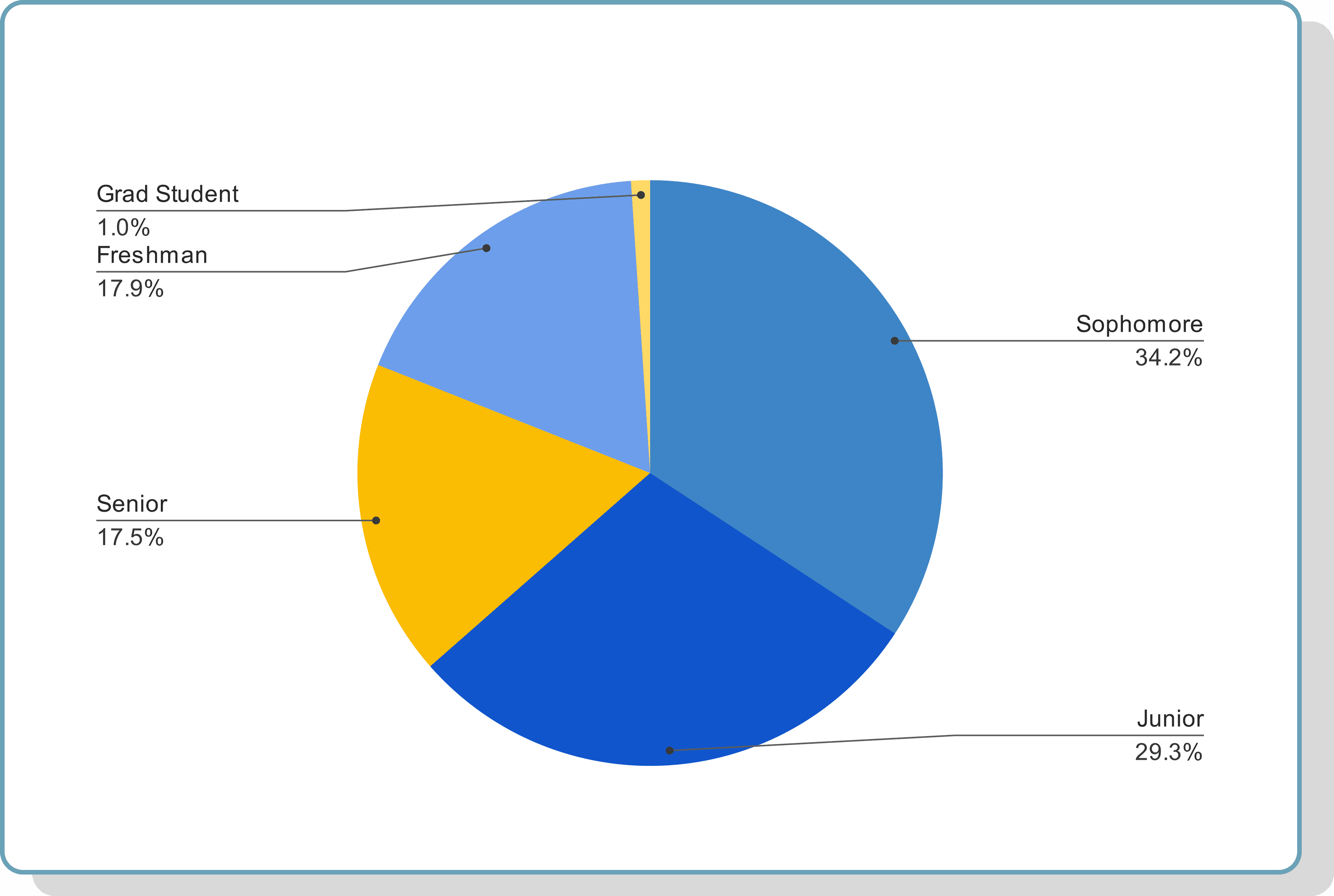
Student demographic for 669 survey participants
Research Highlights
⭐ Average Rating
2.56 out of 5.00
🖱️ Use Frequency
89% of students have used WebReg 10 or more times
➡️ That is a high percentage of returning users
📱 Mobile Friendly
On a scale of 1 to 5, students rated 3.94 on the importance of a mobile-friendly design
🖥️ Most Preferred Features
Integrate Schedule of Classes*
Waitlist Notifications & Status
Schedule Planner
More Efficient Queue
Search Bar
Live Chat Support
*Schedule of Classes is UCI's course catalog
HEAR FROM THE STUDENTS
🧑🏻🦰
"Too complicated. The whole process is very tedious and I always have to go back and forth between so many tabs."
👩🏻
"There were multiple times when WebReg would not be clear about why I was unable to apply to certain classes."
🧒🏽
"The interface seems outdated and it's surprising that a school with this many students doesn't have a website to keep up with the population."
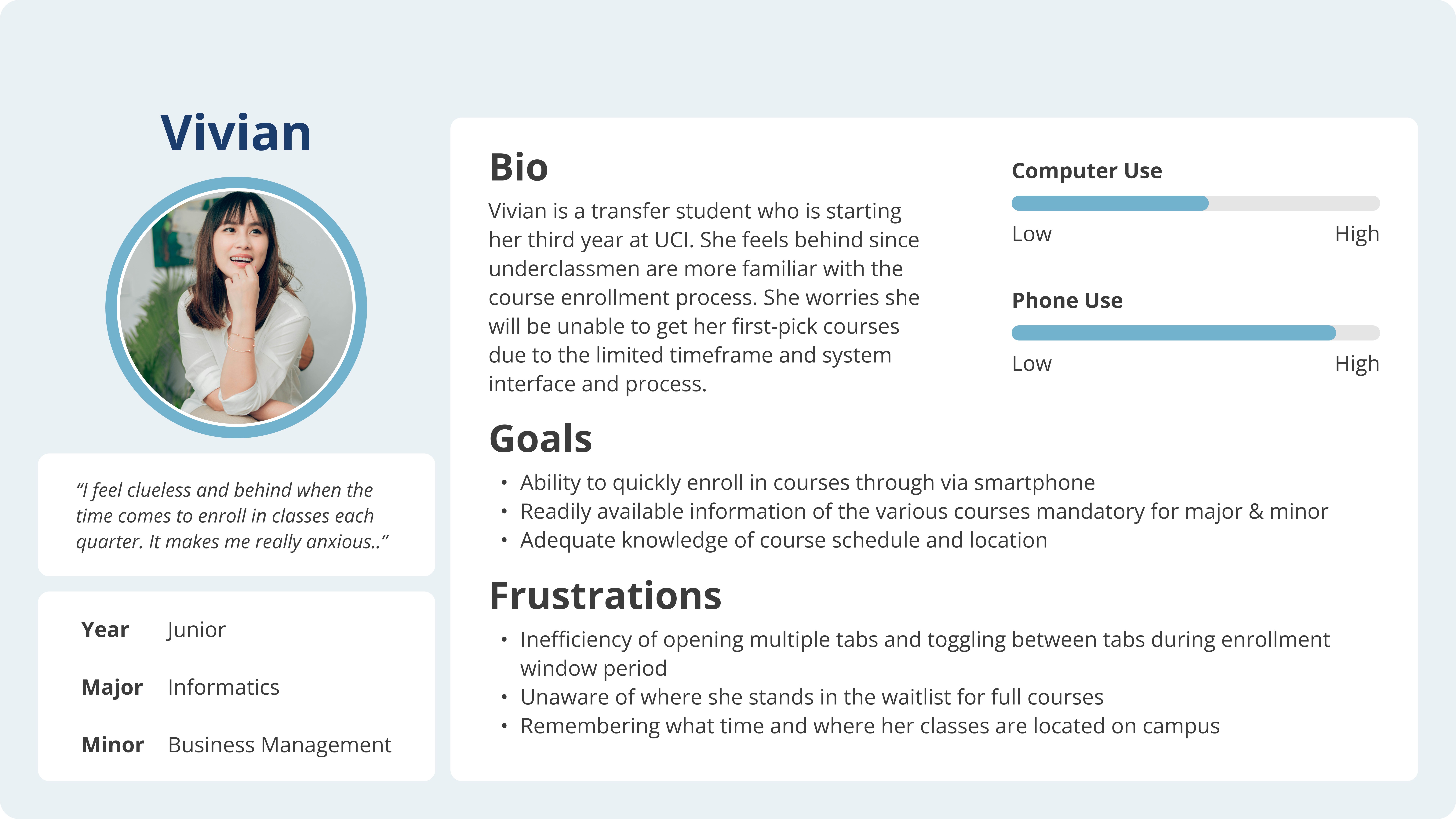
User Persona
IDEATION
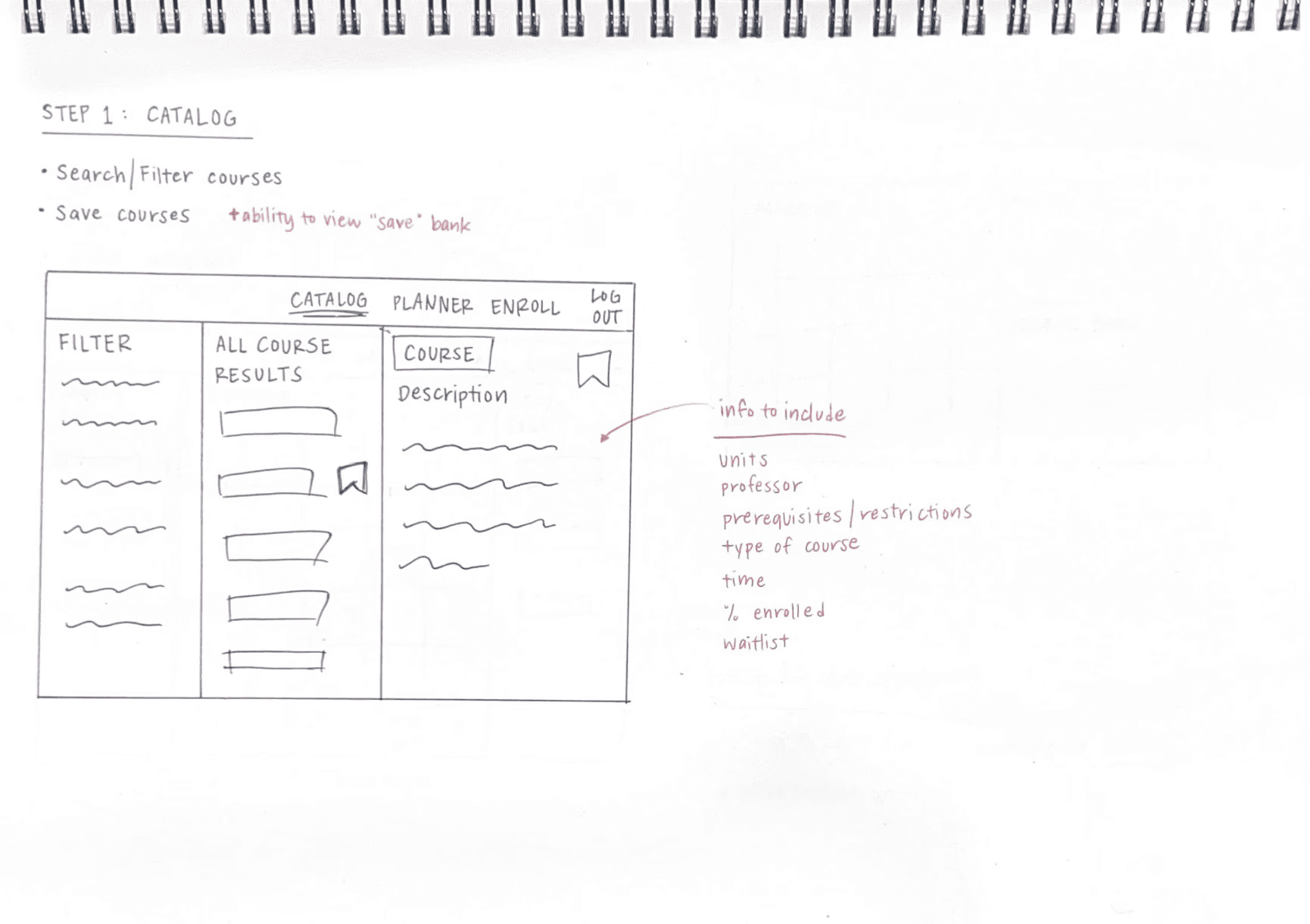
Brainstorming features to include and layouts on paper
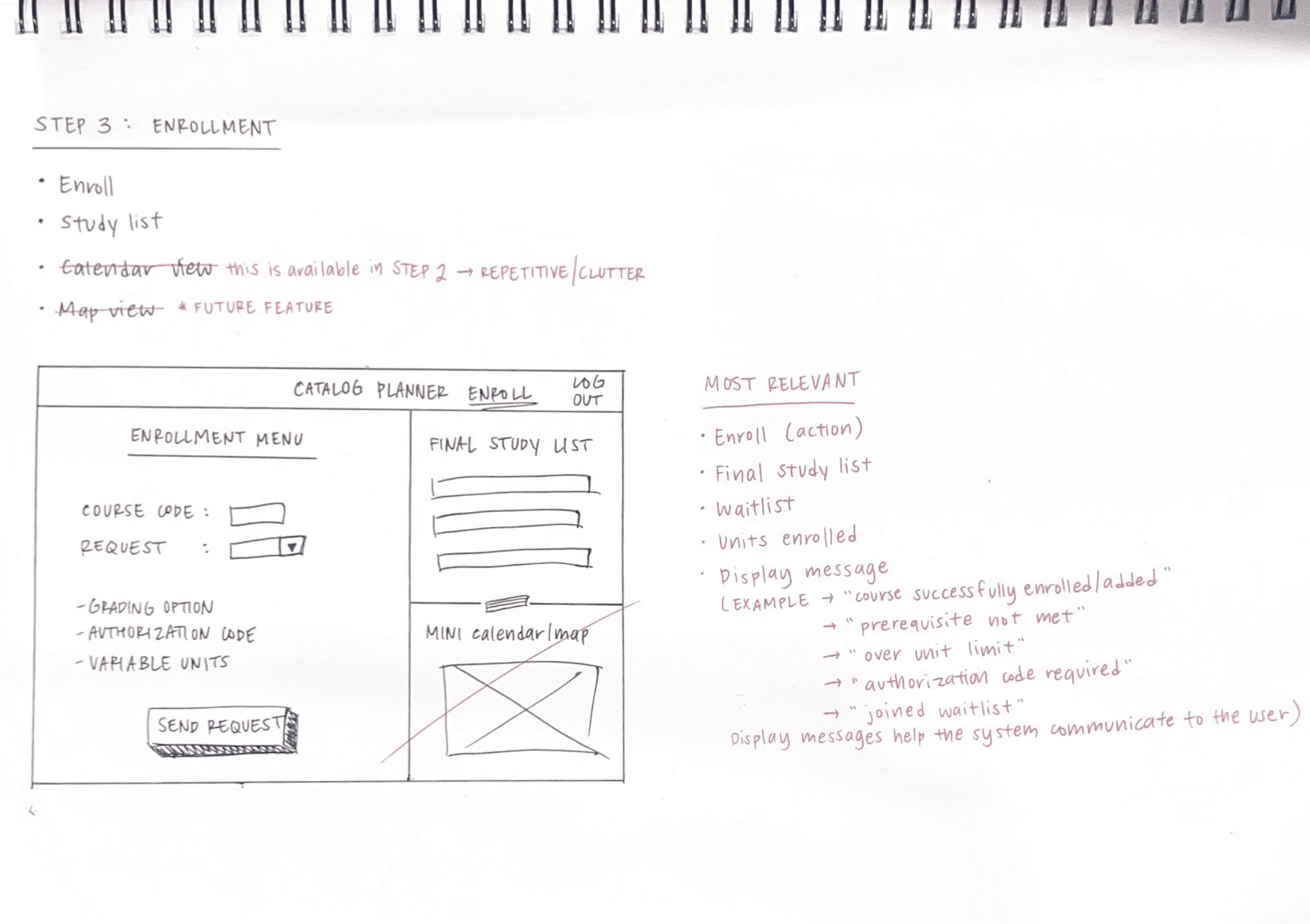
Early on, I worked on providing sketches of the site layout on paper. This was immensely helpful for myself and the team as it helped us visualize the steps in the user process and address any problems early on.
Catalog
Planner
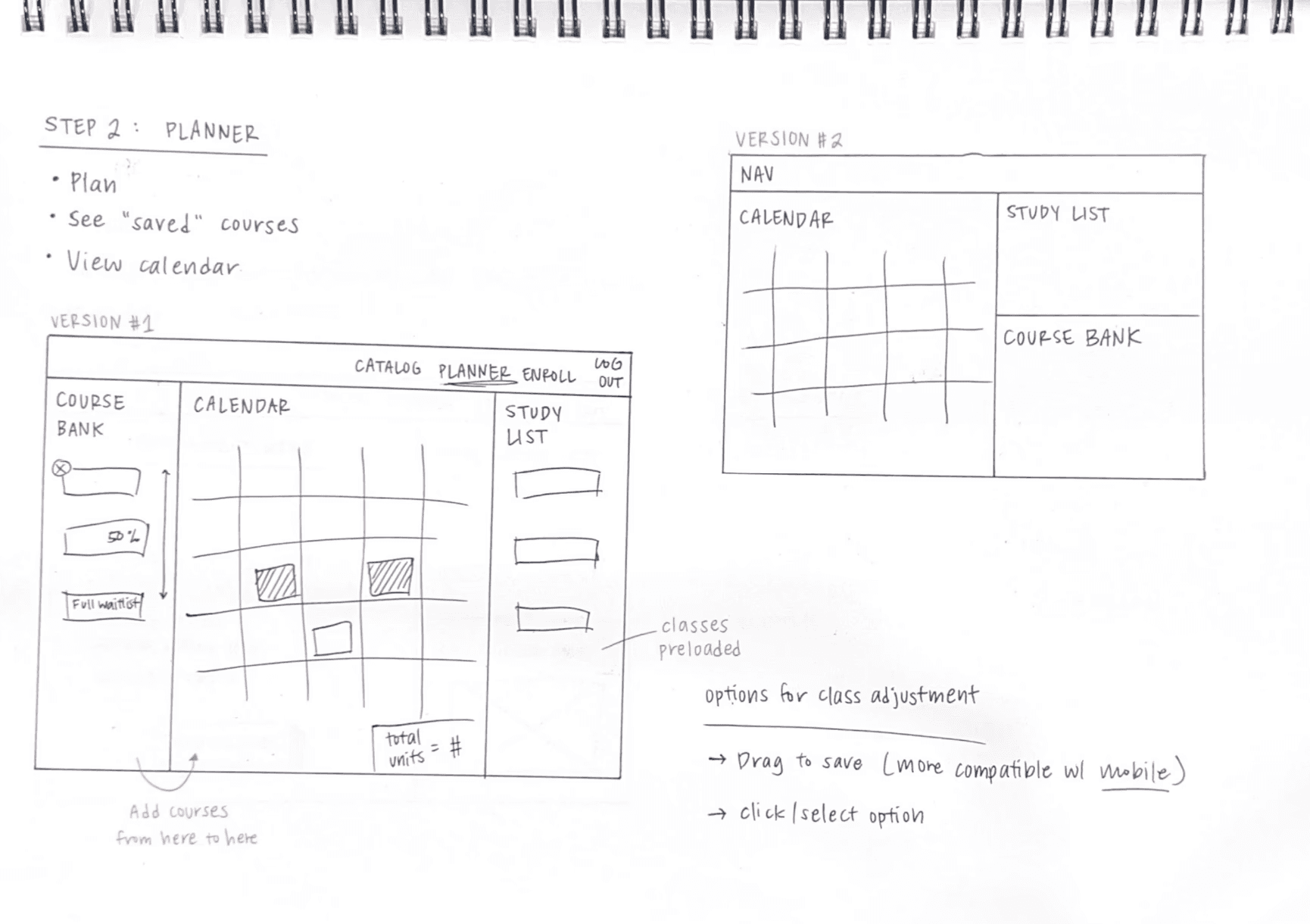
Enroll
LOW FIDELITY
Laying the foundation with wireframes
Catalog
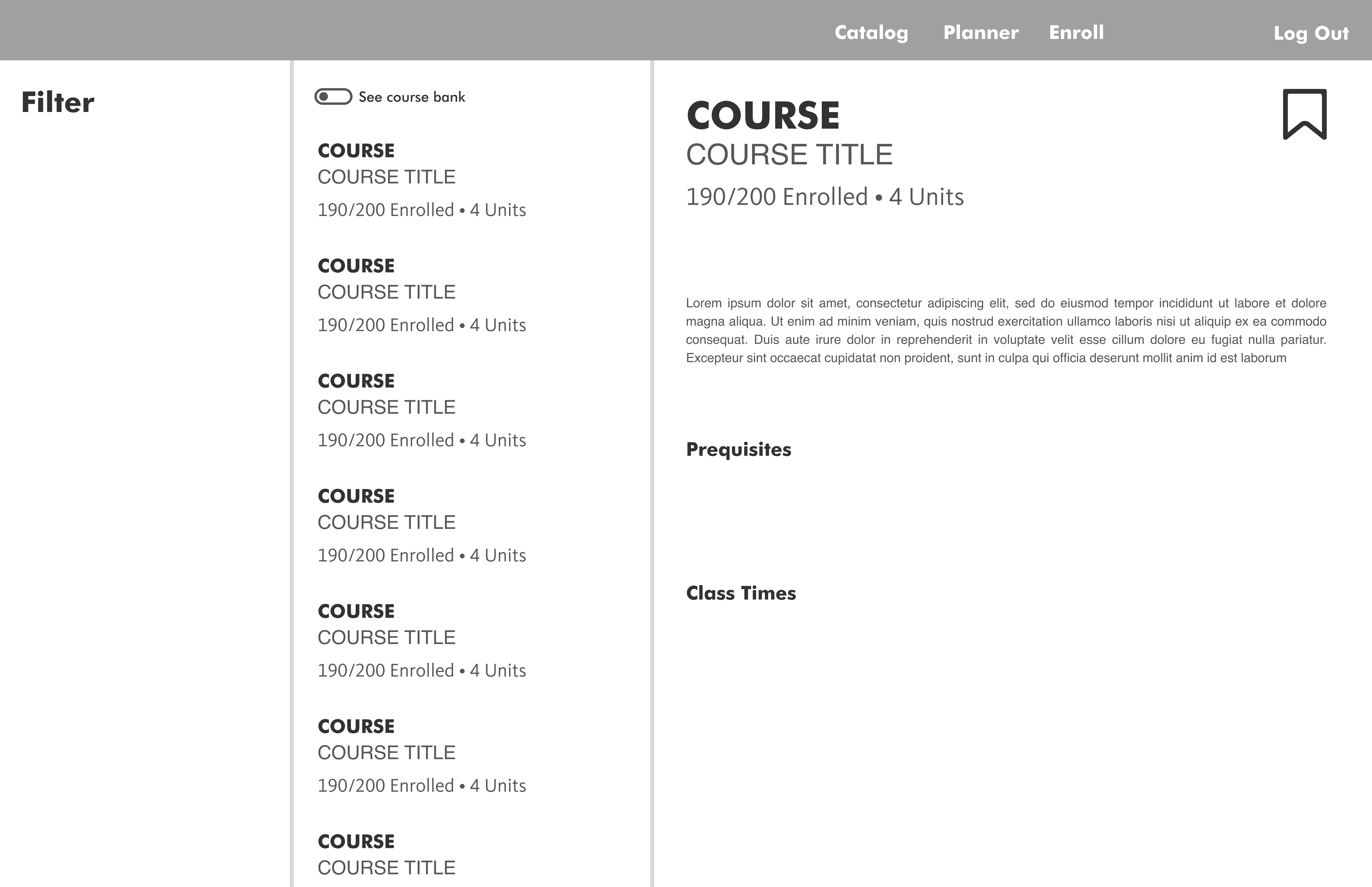
Planner
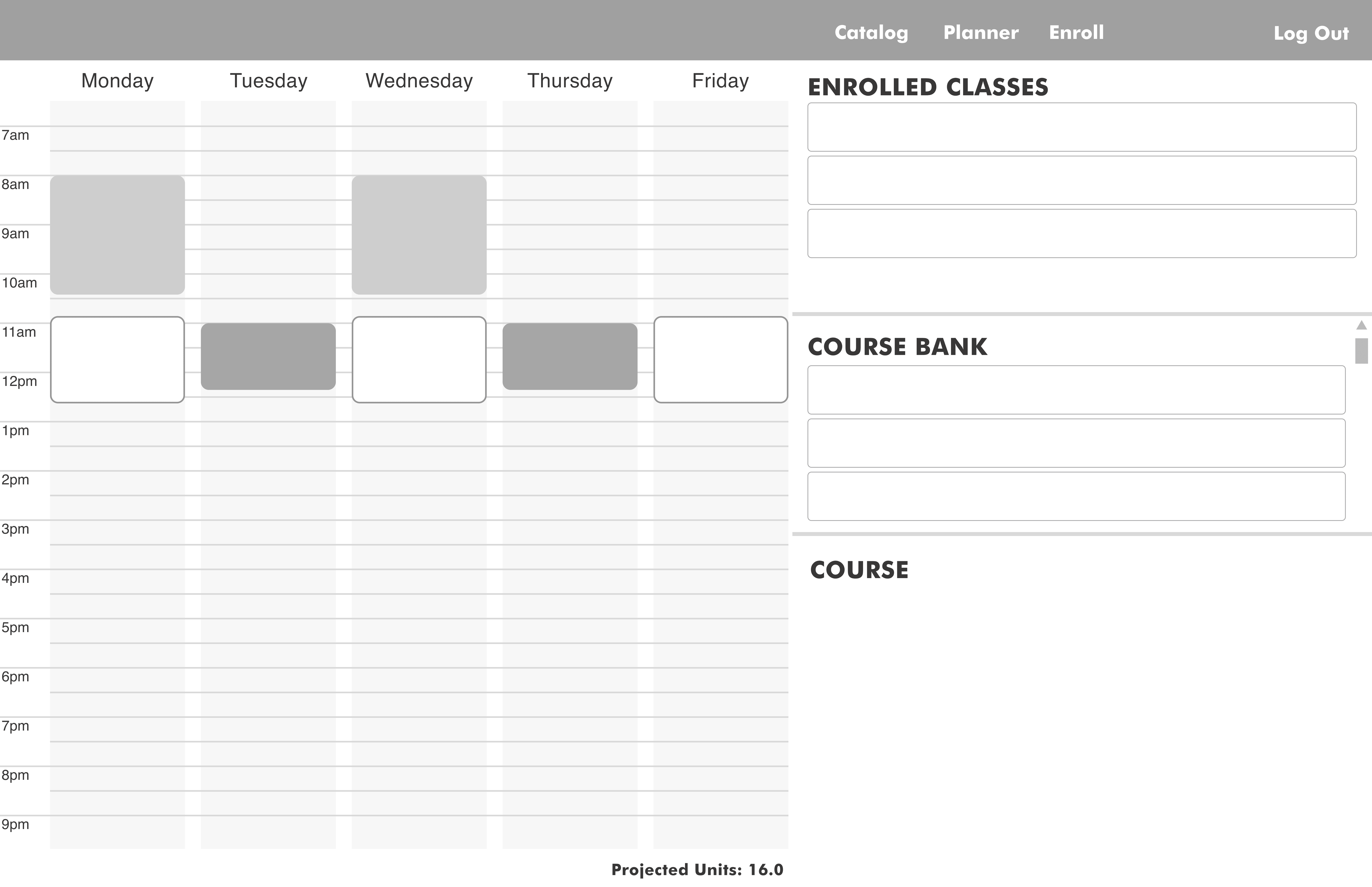
Enroll
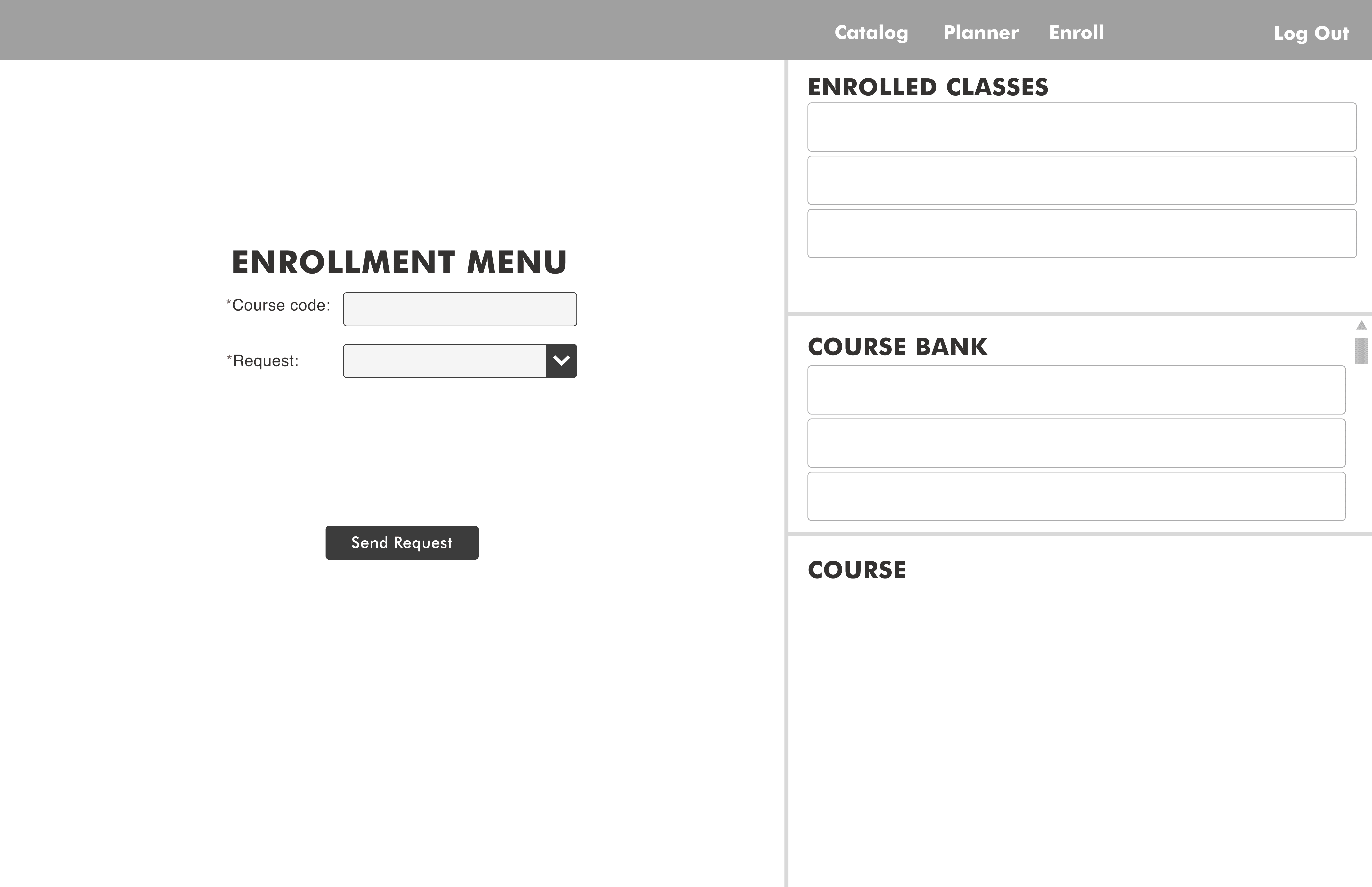
HIGH FIDELITY / INITIAL PROTOTYPE
Our first prototype wasn't final — it was a conversation starter
During the two-week hackathon, my team and I created a prototype, which would be considered an initial draft. Our prototype was a good start — but it had plenty of room for improvement as it did not undergo any user testing.
USABILITY TESTING
The best feedback come from the users, not the judges
ITERATIONS
Addressing pain points with thoughtful design decisions
A deep dive into design decisions that made a significant difference for the overall UX.
1
Integrated Panel View
Synthesizing various platforms to streamline the process
Before
Previously, all these enrollment-related resources were their own sites.
After
Consolidating everything into an all-in-one platform resulted in • Reduced toggling back and forth between resources • Better handling of high volumes of information • Structured workflow for the user during the enrollment process • Adjustable, responsive panels offer flexibility and customizability • Accessible, convenient, and time efficient
2
Accordions for Information Architecture
Cluttered Navigation & An Overwhelming Amount of Content
Before
Within the course catalog, having the entirety of each course and its description displayed was an extensive amount of content — it was overwhelming and a whole lot of scrolling.
After
Utilizing accordions to organize content about each course resulted in • Ability for the user to control amount of information they want to view at any given time • Reduced scrolling • Clean, simplified view
3
Spacing
Body
Before
The text fields hardly had any spacing in between them and minimal padding. Users are more prone to misclicking the wrong area, especially for mobile usage and when they are on-the-go.
After
Proper spacing and use of white space contributed to • Improved readability and comprehension • Enhanced scannability • Visual hierarchy to guide the user's eyes through the content
4
Unclear Enrollment Status
Body
Before
Students were frustrated by vague error messages like “Course was not successfully added” or “You are not eligible to enroll at this time”
After
Reduced uncertainty and gave students actionable next steps by adding specific, informative messages such as “Course not added due to missing prerequisite of MGMT 101” or time-based messages such as “Restriction lifted for all schools and majors on October 15, 2025 at 9:00 AM”
5
Confusing Terminology
Body
Before
Students did not understand what “Course Bank” meant
After
Renamed to “Saved Courses” (student-suggested) Students immediately recognized the feature’s purpose without needing explanation
6
Visual Design & Professional Feel
Remarkable design system to to establish credibility for a large organization
Before
Students felt that the first prototype did not look polished and seemed to lack credibility
After
Created a typescale, reusable components, and consistent design system A more polished, professional look that participants trusted
HIGH FIDELITY / FINAL PROTOTYPE
Presenting an integrated and simplified enrollment experience
The reiteration of this prototype had more thought given to the specific design decisions that abided to UI design principles and, most importantly, addressed user pain points.
Final Prototype
NEXT STEPS
Future considerations for the project
📱
Responsive Design
Students are able to register for courses via PC or mobile devices — and many use their mobile devices for convenience and quick access. We would create a responsive design prototype if given more time.
📎
Course Schedule as Images
It is very common for students to screenshot and save a photo of their new course schedule to reference again. After providing a responsive design of the site, I would consider adding a feature that allows students to download a copy of their course schedule. Providing a compatible format and file type (for both desktop and mobile views) of their course schedule comes in handy for students to set their schedule as their wallpaper!
🚀
Launch for Feedback & Reiterate
Our team only pitched our project to the judges with a short prototype demonstration. The next steps would be to release the prototype to groups of UCI students, gather feedback from their experiences, revise by incorporating the feedback and additional research — and repeat.
LESSONS LEARNED
Takeaways to carry with me in my learning journey
1️⃣ Affordances & Signifiers
From my Designlab bootcamp, I learned about affordances and saw how this was heavily applicable and relevant to the outdated UCI course registration site. The current design of the interface is quite flat, and it is difficult for students to recognize affordances.
💡
How can the user distinguish what is a button and what is not? Which buttons are active?
2️⃣ Don't Be Afraid to Change Old Systems
This was a website I had been using so often for the past 4 years in college. So I was eager to tackle issues that I had noticed early on but failed to pursue further. I am glad I participated in the hackathon project during my senior year because this inspired me to not be afraid to question or change old systems. Although the registration site is many years old, that does not mean it has to stay this way if it is not working for its users.
💡
What issues do I see in the daily products that I use? Why not change it or reimagine improvements to the current system?
NEXT PROJECT
Thanks for reading!
Check out another redesign project I did for an eCommerce mobile app!
🚀 Haul Mobile App Redesign
Happy you're here!
Get in touch.
Made with lots of

and

ⓒ 2025 Cece Ross